


Faqs
General
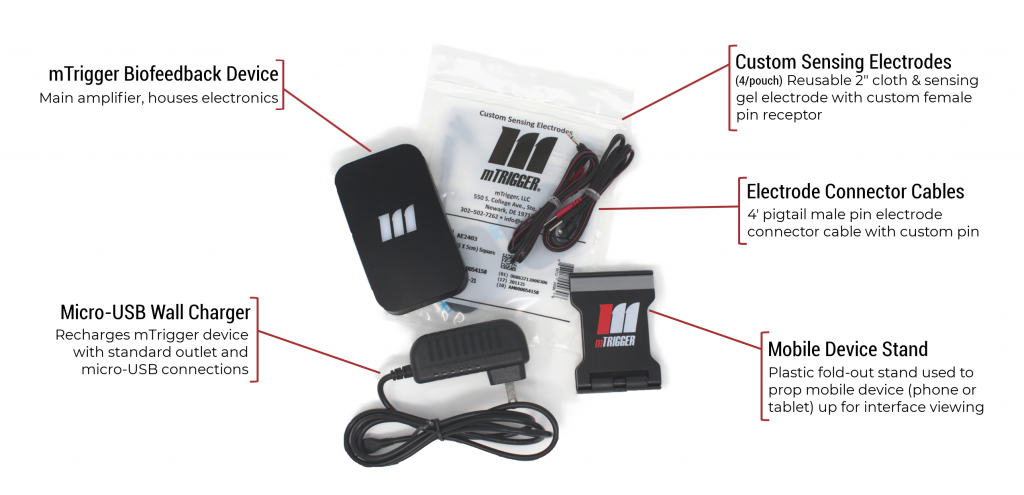
You will need a mobile device (phone or tablet compatible with Bluetooth Low Energy and running Android 6 or iOS 11 or higher) to use the mTrigger Biofeedback System. Other than that, your bundle includes the accessories you will need.
sEMG stands for surface electromyography. Surface indicates that the sensors are placed on, not into, the skin; in the mTrigger Biofeedback System, we use self-adhesive custom sensing electrodes. Electromyography is a process which reads the electrical activity produced in skeletal muscles during muscle movements/contractions by detecting the electric potential in muscles. This informs the signal we display and interact with in our mobile interface. See our Science section (About)or visit our Resources links (Getting Started) for more information.
See our Getting Started page for an introductory video as well as setup resources to get yourself acquainted with our system. The real beauty of biofeedback – beyond ease of use – is its versatility. We can start you off with basic protocols for things like post-op treatment of knee replacements, rotator cuff tears, and ACL reconstructions – but the sky is the limit! We want to see what you can do, so don’t hesitate to reach out with application questions or ideas.
Post-operative joint rehab applications help patients see their early voluntary contractions. mTrigger can also be used to monitor two muscle channels during therapeutic exercise, allowing for bilateral assessments, compensation analysis, and co-contraction monitoring. For example, a therapist may want to ensure the right balance of activation in lower vs. upper traps during rotator cuff rehab, or ensure that a patient is being mindful of the use of their hamstrings or gluts during knee extensions post-TKA.
mTrigger is also used with other tools and modalities like blood flow restriction (BFR), resistance training (e.g. with TheraBand), and relaxation training. mTrigger can be used for general physical therapy, orthopedics, sports rehabilitation, strength training, and pelvic floor – just to name a few!
In name, we have created a system that uses voluntary muscle contractions to trigger a motivating and mobile biofeedback solution.
At our core, we stand for providing engaging tools that enable better outcomes, empowering patients and providers, and a commitment to innovation.
Unfortunately, at this time, mTrigger is unable to offer shipping outside the United States. If you are located outside the US and want to let us know you are interested in purchasing, please let us know HERE so that as we grow we can understand our international demand and add the necessary support to offer our product to you in the future!
FOR SYSTEM OWNERS
Click here to visit our setup and training page, where you’ll find a video series to help you understand the basic functionality, features, and usage of the mTrigger Biofeedback System and mobile application.
And advanced applications database is coming Summer 2020, but if you have any questions about clinical applications, please email your inquiry to info@mtrigger.com!
Search for mTrigger Biofeedback on either the Apple App Store (for Apple/iOS devices) or Google Play Store (for Android devices).
Minimum OS compatibility for Apple devices is iOS 11; minimum OS compatibility for Android devices is Android 6. Mobile device must be Bluetooth Low Energy (BLE) compatible to support app. Ensure location services are enabled for the mTrigger app (supports Bluetooth functionality).
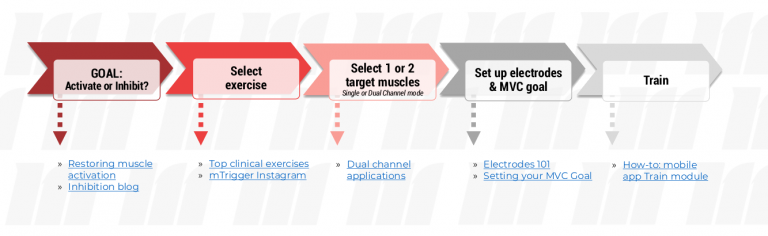
Ask yourself what you want to learn or achieve by adding biofeedback. Customize your setup, then let mTrigger do the rest!
Many therapists use mTrigger for post-op rehab, especially on muscles surrounding the shoulder and knee; primary examples include ACL, TKR, and rotator cuff. Such applications help patients to effectively perform early maximum voluntary isometric contractions (MVIC). Other top applications include targeting of the soleus in Achilles tendinitis rehab and targeting of the spinal erectors. mTrigger can also be used to monitor two muscle channels at once, allowing for bilateral assessments, compensation analysis, and co-contraction monitoring. For example, a therapist may want to ensure the right balance of activation in lower vs. upper traps during rotator cuff rehab, or ensure that a patient is being mindful of their hamstring or glute activation during knee extensions post-TKA.
mTrigger can also be used to monitor and isolate contractions during preventative exercises or training, for relaxation/inhibition/resting tension training, or occupational therapy applications.
We don’t recommend it! The mTrigger electrodes and electrode connector cables are custom for the mTrigger system, with a special connector and features that are designed to improve signal transmission. Use of unauthorized electrodes or electrode cables not specified or sold for use with the system may result in ineffective signal transmission or cause damage to the system.
If you need smaller electrodes for a specific patient or application, the electrodes can be cut down to the appropriate size and perform as intended so long as the central lead (feel for a short raised vein) is not damaged.
Absolutely – Bill time during sessions via biofeedback (CPT: 90901 ), neuromuscular re-education (CPT: 97112), or therapeutic exercise (CPT: 97110).
mTrigger units can be used for a few days without charge. All units accept micro-USB charging and the LED behind the logo will turn green to indicate a full charge. Recommended charging frequency is once per week; do not charge overnight.
No. Using the unit while it is actively charging will damage the battery and negatively impact the electrical signal displayed in the interface.
Ensure that your unit is not resting on another electronic device or conductive surface. While this will not damage the system, it some electrical noise could impact the signal displayed in the app. Remove the device from contact with other electronic devices during use to get the best signal.
If issues persist, troubleshoot via:
- Force close the mTrigger app; reopen app; reconnect your mTrigger
View instructions for iOS | View instructions for Android - Turn mTrigger off and back on
- Switch to new electrodes
- Ensure the proper cables are in the proper channel inputs
- Adjust goal
- Try mTrigger on a different muscle or subject
Note that during the first 5-10 seconds after powering on, your device may display what appears as hypersensitivity when viewing activity in Train. This is a calibration period. If hypersensitivity persists beyond 30 seconds, please document the issue and report it to mTrigger Customer Service.
sEMG is inherently somewhat noisey, and some signal fluctuation is expected. However, if you are seeing signals displayed that consistently seem unresponsive or inappropriate in relation to activity, document the issue you are seeing and contact customer service; have your invoice and serial numbers on hand. We will assess the issue remotely and determine appropriate next steps. For more details, refer to the mTrigger user manual.
- Turn your mTrigger off and back on to disconnect any pairing with a different mobile device.
- Ensure that Bluetooth is “on” / enabled on your mobile device. If you selected “Don’t Allow” instead of “OK” when this prompt came up the first time you used the app, you will have to proceed to the next step.
- Check device settings to ensure that the mTrigger AND mTrigger game apps have the appropriate Bluetooth and/or location permissions.
View instructions for iOS | View instructions for Android - Check your charge level by plugging your mTrigger into the charger – if the m is red, wait for it to turn green. Low battery can impact Bluetooth functionality.
- If you are unable to connect following the above steps OR the serial number on the back of your mTrigger does not match the serial number displayed in the app, please contact customer service.

FOR PROSPECTIVE OWNERS
You can download the app for free, but you won’t be able to access most modules without having connected to an mTrigger unit. See the screenshots provided on the app store(s) for views of the app, or contact us with specific questions.
Additionally, feel free to download our setup resources, available on our Getting Started page.
All purchases of an Individual Unit or Clinical Bundle include a 30-day money-back guarantee. Please contact us to request an estimate if needed.
For Pelvic Floor Therapy
mTrigger is a biofeedback system that helps you see how your pelvic floor muscles are working in real time. Sensors detect muscle activity and display it on a screen, helping you learn how to:
• Contract your pelvic floor muscles correctly
• Fully relax your pelvic floor muscles
• Improve muscle coordination and control
• Practice exercises with real-time feedback from your therapist
Think of mTrigger as a "mirror" for muscles you cannot directly see.
Your therapist may use biofeedback to help address:
• Pelvic floor weakness
• Urinary leakage (incontinence)
• Urinary urgency or frequency
• Pelvic pain
• Constipation
• Difficulty relaxing the pelvic floor
• Postpartum recovery
• Core and breathing coordination
• Learning how to push or bear down correctly
Biofeedback does not strengthen muscles on its own. It helps improve communication between your brain and your muscles so you can learn to use them more effectively.
External Electrodes
• Adhesive electrodes placed near the pelvic floor muscles, typically on either side of the external anal sphincter
Internal Probes
• Vaginal probe
• Rectal probe
Your therapist will help determine the most appropriate option based on your condition, goals, and comfort level.
If the graph is not responding during a contraction, consider the following:
• The goal may be set too high. Pelvic floor muscles produce smaller signals than larger muscle groups. A starting goal of approximately 100 mV is often appropriate.
• Sensor or probe placement may need adjustment. Internal probes may need to be rotated slightly. External electrodes should have good skin contact and avoid excessive hair.
• Other muscles are activating instead of the pelvic floor.
• The pelvic floor muscles may be too weak or difficult to isolate initially
• Changing positions or using different verbal cues may help.
• Lying on your back with your legs supported is often the easiest position for beginners.
• Confirm that the sensor is connected to Channel 1.
Small changes in the graph can occur for several reasons:
• Normal breathing
• General body movement
• Muscle tension at rest
• Shifting of electrodes, probes, or cables
• Activation of nearby muscles such as the glutes, abdominals, or thighs
• Electrical interference from nearby equipment
To reduce interference:
• Move away from devices using Bluetooth
• Unplug hydraulic treatment tables if possible
• Turn off nearby televisions or large electronic equipment
• Make sure all cables and sensors are securely connected
Single Channel
Recommended for most pelvic floor training sessions.
• Focuses on pelvic floor muscle activity only
• Simplifies training and feedback
• Ideal for beginners
Dual Channel
Useful for more advanced training.
• Monitors pelvic floor muscles and another muscle group simultaneously
• Helps assess muscle coordination and co-contraction patterns
• Commonly used with abdominal or gluteal muscles
Most patients begin with Single Channel mode and progress to Dual Channel as needed.
The best goal depends on your treatment objective.
For Strength Training
• Ask the patient to perform a strong pelvic floor contraction
• Observe the highest value reached
• Use that value as the exercise goal
• A starting goal between 150–200 mV may be appropriate for some patients
For Relaxation Training
• Set the goal to approximately 50 mV
• Encourage the patient to lower the graph as close to 0 mV as possible
• Focus on reducing muscle tension and improving relaxation
Your therapist may adjust these values over time based on your progress.
Follow the exercise program prescribed by your therapist. Consistency is more important than intensity. Regular practice helps improve muscle awareness, coordination, and long-term outcomes.
Yes. Many patients use mTrigger both in the clinic and at home. Your therapist will provide guidance on exercise selection, sensor placement, and training goals to ensure safe and effective use.